Free tool
Mac keyboard shortcuts cheat sheet
A free, printable Mac keyboard shortcuts cheat sheet — built from your actual shortcuts, not a generic list. Edit the defaults, generate a clean one-page reference, and print it or save it as a PDF in under a minute. No signup, nothing installed.
What the builder does
The Cheat Sheet Builder starts with the full Automacy shortcut set — launcher, window snapping, applications, folders, and the Hyper Key layer — organised into editable sections. You can rename sections, change any hotkey or command, add your own rows, reorder everything, and set your own title and watermark.
When it looks right, one click generates a screenshot-optimised page with clean typography, ready to print, save as a PDF with Cmd + P, or share as an image. You can also export your setup as JSON and re-import it later.
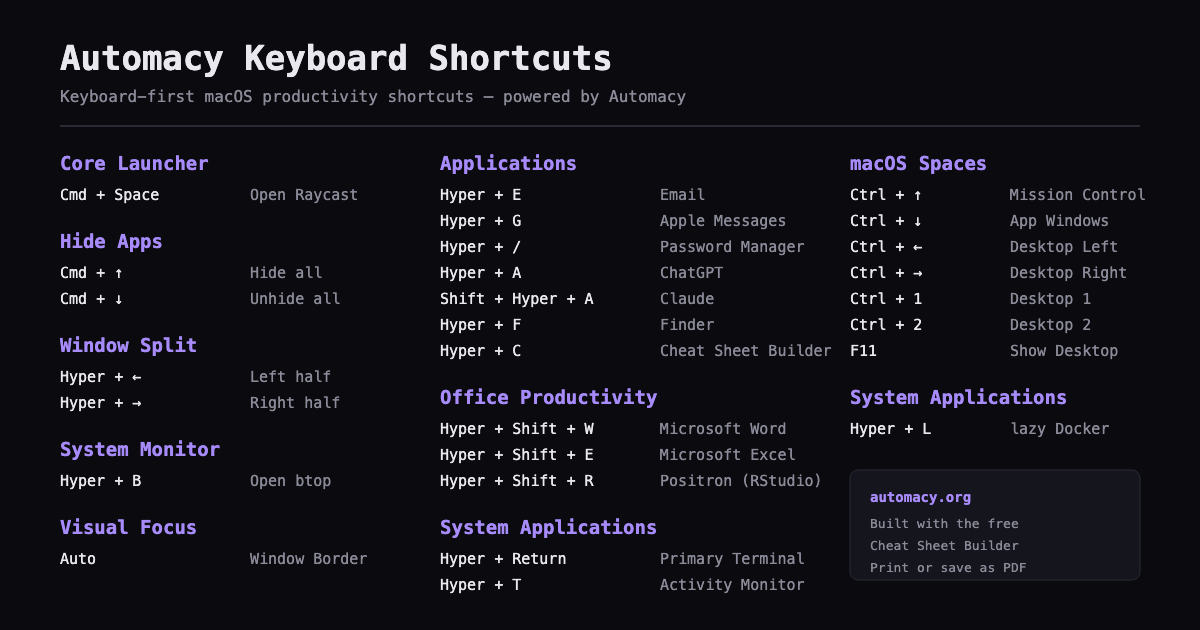
A starter set of Mac shortcuts
These are the core macOS shortcuts most cheat sheets begin with. For the full grouped reference — window management, text editing, screenshots, Finder, browser, and the Hyper Key layer — see the complete Mac keyboard shortcuts list.
| Action | Shortcut |
|---|---|
| Open Spotlight (or Raycast) | Cmd + Space |
| Switch apps | Cmd + Tab |
| Copy / Cut / Paste | Cmd + C / X / V |
| Undo | Cmd + Z |
| Capture selected area | Shift + Cmd + 4 |
| Screenshot toolbar | Shift + Cmd + 5 |
| Quit app | Cmd + Q |
| Close window or tab | Cmd + W |
| Find | Cmd + F |
| Print / Save as PDF | Cmd + P |
Why build your own
- It matches your machine. A generic list shows shortcuts you never use; a cheat sheet built from your setup — including custom Hyper Key shortcuts — is the one you actually reach for.
- It stays current. Your edits are saved in the browser, so when your shortcuts change, regenerate the page instead of re-typing a document.
- It prints properly. The generated page is designed for one clean sheet — no cropped tables or browser chrome — which is what “macbook shortcuts PDF” searches are really after.
The default shortcut set comes from the Automacy guide — a calm, keyboard-first macOS setup built around Raycast and the Caps Lock Hyper Key.
Frequently asked questions
Is it free?
Yes. The Cheat Sheet Builder is completely free — no signup, no account, no watermark you can't change. It runs entirely in your browser.
Can I print it or save it as a PDF?
Yes. Generate your cheat sheet, then print it with Cmd + P and choose “Save as PDF”. The output is designed to fit cleanly on a page, so it works as a desk reference or a shared PDF.
Do I need to install anything?
No. The builder is a web page. Your edits are kept locally in your browser, and nothing is uploaded anywhere.
Does it work on any Mac?
Yes — it's a browser tool, so it works on any Mac (or any computer). The default shortcut set is the Automacy macOS setup, and every section is editable.
Can I edit it after generating?
Yes. Your cheat sheet is saved in the browser, so you can come back, edit sections, and regenerate at any time. You can also export the underlying JSON and re-import it later or on another machine.
Ready when you are
Open the builder, tweak the defaults, and print your page. It takes about a minute.
Related: the complete Mac keyboard shortcuts reference · the Automacy setup guide.